// OPENBOX DOCS
OpenBoxGL
A local-first game library and launcher for Linux and Windows.
OpenBox Game Launcher for Linux and Windows
One library for Steam, ROMs, and emulators.
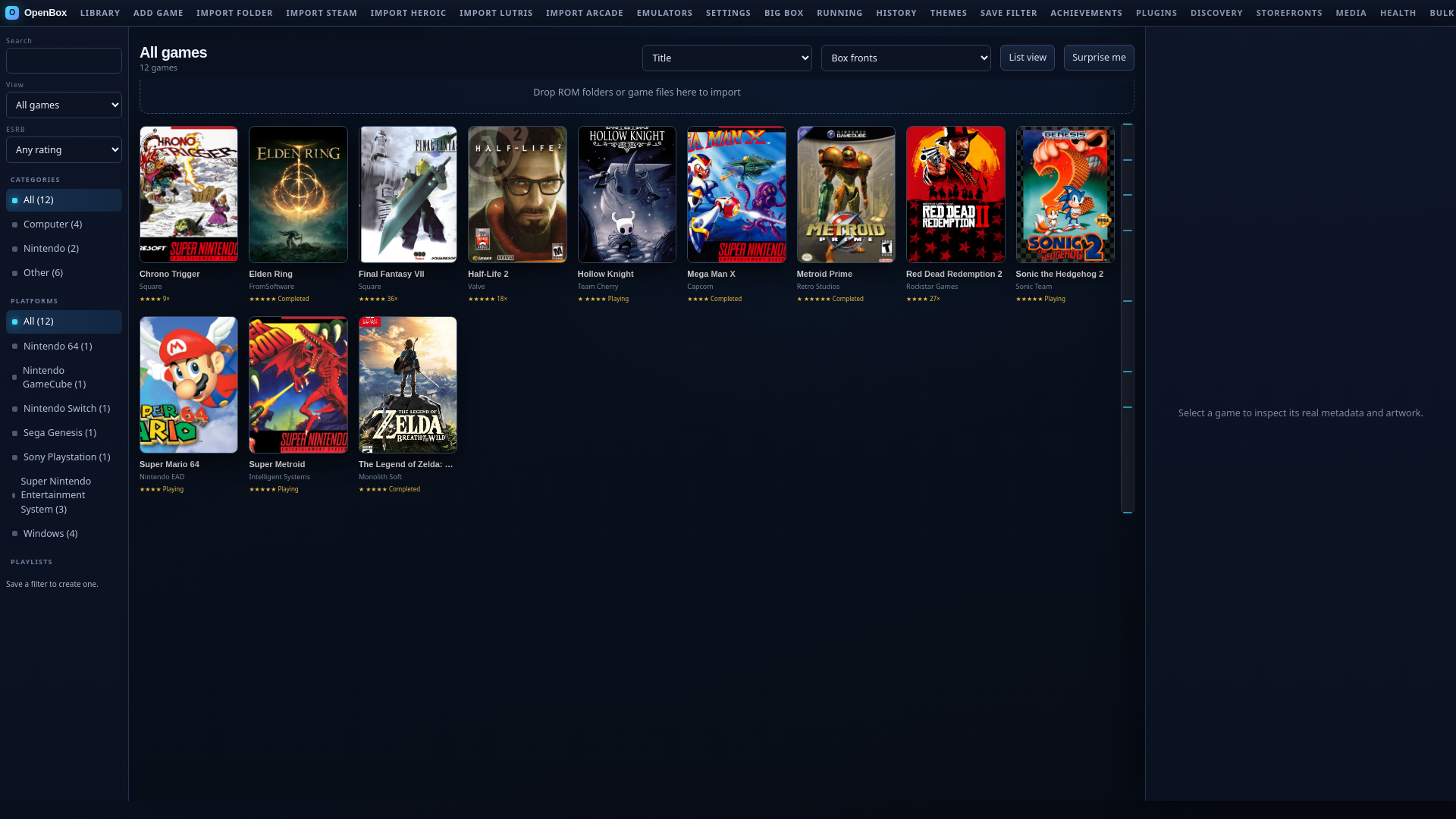
OpenBoxGL brings mixed game collections into one searchable catalog. Keep library data on your machine, enrich it with artwork and metadata, then launch and track play from the same interface. No account, no vendor cloud lock-in, no telemetry.
Install OpenBoxGL 1.15.0 Read the quick start **Read the release notes
What OpenBoxGL is
OpenBoxGL is an open-source game library manager and launcher for Linux and Windows. It works with the game files, storefront clients, emulators, and folders you already use. No OpenBox account is required, and the library is stored locally under your control.
The application ships one UI over two hosts, both over the same local data:
| Host | Entry point | What it is for |
|---|---|---|
| Native window (Linux) | openbox or openbox-native | Default desktop window (WebKitGTK), full feature set |
| Native window (Windows) | openbox.cmd or powershell -File .\openbox.ps1 | WebView2 desktop window; the released install ships the compiled host, so no build step is needed |
| Web UI | openbox --web or python3 web_app.py (Linux); openbox.cmd --web (Windows) | Development and debugging, REST API, Big Box mode |
When you start OpenBox, a local server starts on 127.0.0.1 and the native window renders the UI against it. With --web, your browser opens to the same server instead. The server never listens on the network, and every request must carry a per-launch token, so the window (or tab) you open is the only client.
OpenBoxGL is independent from the Openbox window manager and from LaunchBox and Unbroken Software, LLC. Those names appear only to describe compatibility and comparison boundaries.
How it works
- Bring in your libraries. Import Steam, Heroic, Lutris, Gameyfin, ROM folders, arcade sets, executables, and emulator collections. Imports scan local manifests or folders and add only entries that are not already present, so re-running an import never duplicates.
- Organize and enrich them. Search, filter, tag, rate, group, edit metadata, download media, build playlists, and create pathless shelf entries. Metadata syncing and media downloads are optional and can be limited per import so large libraries stay responsive.
- Launch and track play. Use profiles and tokenized commands, then keep session history, saves, queue state, and backups together. Every launch records a session with duration and exit status, unless you disable session history in Settings.
What it does at a glance
Each area has its own guide. The cards below say what you will find there.
Why OpenBoxGL
OpenBoxGL exists because LaunchBox is a mature, feature-rich Windows library manager with no Linux build, and the alternatives that exist on Linux are usually storefront-specific (Steam, Heroic, Lutris) or emulator-specific (RetroArch, EmulationStation). None of them put a mixed collection, Steam games, GOG titles, ROMs, arcade sets, and standalone executables, into one searchable, art-rich, trackable catalog with a controller-friendly fullscreen mode.
| Goal | How OpenBoxGL meets it |
|---|---|
| One catalog for everything | Steam, Heroic, Lutris, Gameyfin, ROM folders, arcade DATs, ScummVM, RPCS3, Vita3K, and loose executables import into one library. |
| Rich metadata and artwork | LaunchBox Games Database daily sync, IGDB search, Steam/GOG media, EmuMovies, and Bezel Project, with bulk media jobs and duplicate cleanup. |
| Real launch profiles | Tokenized commands ({path}, {rom_name}, {app_id}, …), per-game overrides, archive extraction, and dependency checks, no shell interpolation. |
| Controller-friendly fullscreen | Big Box with Stage, Hybrid, and CoverFlow layouts, gamepad mapping, screensaver/attract mode, and gamescope guest support on Linux. |
| Protect your saves | Save discovery across Steam Cloud, RetroArch, PCSX2, PPSSPP, RPCS3, Dolphin, and Cemu; versioned backups with restore guards; Ludusavi/Hoard hooks. |
| Track play honestly | Per-session history with duration and exit code, progress automation, and mounted-folder statistics sync across machines. |
| Move libraries safely | Review-first LaunchBox XML migration plus opt-in causal catalog sync with preview, conflict choices, recovery, and local launch configuration preserved. |
| Automate locally | Play queue, tags, notifications, and HMAC-signed webhooks, all local, no account. |
| No subscription | Every LaunchBox-Premium-equivalent workflow (custom fields, ESRB filters, list view, media packs, cloud statistics sync) ships free. |
The full capability matrix, including what is intentionally not replicated on Linux and Windows, lives in the parity matrix.
Interfaces and data
The full-featured UI ships as a native window by default — WebKitGTK on Linux, WebView2 on Windows — with the same UI available over the loopback web server for development. The Windows portable install ships the WebView2 host compiled, so the native window opens with no build step; a source checkout builds it with scripts/build_native_host_windows.ps1, and until that binary exists the launchers open the same UI in a browser app window, so Windows works out of the box either way. Both hosts render the identical index.html and static/ ES modules (app.js, state.js, library.js, settings.js, and the rest), and both read and write the same local library data, so there is no second interface to drift.
The default data directory is ~/.local/share/openbox-game-launcher on Linux and %LOCALAPPDATA%\openbox-game-launcher on Windows. Set OPENBOX_DATA_DIR before starting OpenBoxGL when the library should live elsewhere. The variable must be in the process environment at launch: the data directory is chosen at startup, before any .env file is read.
Inside the data directory, the library itself is library.json with a last-known-good .bak copy beside it. Writes are atomic, owner-only, and validated against a schema, so a crash or a bad edit cannot silently corrupt the library.
See Interfaces and data for the full layout of both interfaces and every file OpenBoxGL keeps in the data directory.
Integrations
OpenBoxGL fits around the desktop tools you already use. The documentation covers storefront imports, emulator profiles, RetroAchievements, IGDB, EmuMovies, Bezel Project, Gameyfin, OBS, MAME, Ludusavi, Hoard, mounted-folder sync, plugins, and signed webhooks. Every bundled emulator definition carries its Windows executable name too, so adapter detection, resume state, and Launch Doctor work with Windows emulator builds equally well.
Optional credentials can be supplied through the Settings dialog or through environment variables in a local .env file. See Accounts and media and Configuration.
Your data
OpenBoxGL writes library state atomically and keeps recovery files beside the primary state. Credentials and session tokens are local configuration. API examples use placeholders such as TOKEN, GAME_ID, and /path/to/game.
- The per-launch token is generated each launch, written to
server.tokenin the data directory, and deleted when the server stops. Prefer theX-OpenBox-Tokenheader over atokenquery parameter in your own requests; query strings can end up in browser history and logs. - The diagnostic log (
openbox.log) rotates automatically and redacts tokens, passwords, and API keys. It can still contain game names and local file paths, so review it before sharing it. - Library backups are archives stored in the
backups/folder. Make one before major changes; see Library backups and Data and recovery.
Start here
New to OpenBoxGL? Follow Installation, then Getting started for a local-folder import and first launch. If the app is already installed, start with Library overview.
FAQ
Does OpenBoxGL include games or ROMs?
No. OpenBoxGL does not distribute games, ROMs, BIOS files, firmware, or DRM circumvention tools. You supply the files; OpenBoxGL catalogs, launches, and tracks them.
Does it require an online account?
No OpenBox account is required. Optional integrations may have their own accounts, credentials, API terms, and rate limits. RetroAchievements and EmuMovies use your existing accounts, and metadata syncing talks to the public LaunchBox Games Database with your consent.
What operating systems are supported?
OpenBoxGL targets Linux desktops, laptops, Steam Deck systems, and handheld PCs on x86_64 and aarch64, plus Windows x86_64 since 1.13.0. Linux installs from the AppImage, Flatpak, or source; source installs require Python 3.10 or newer, while the AppImage bundles its own Python runtime. Windows installs from the signed portable package using the published install.ps1, requires Windows PowerShell 5.1, and needs neither curl nor OpenSSL. The runtime itself stays dependency-free on both platforms: standard library only, no pip install, no requirements.txt, no virtualenv. The current requirements and package paths are listed in Installation, and the Windows path end to end is in Windows.
Is my data sent anywhere?
No. Nothing leaves your machine unless you explicitly trigger an integration (a metadata sync, a media download, a webhook delivery, statistics sync, or opt-in catalog sync to a folder you choose). There is no telemetry, no crash reporting, and no OpenBox account. The server binds to loopback only.
Can I run it alongside Steam, Heroic, and Lutris?
Yes. OpenBoxGL reads their manifests and launches through them (steam -applaunch, heroic://, lutris:rungameid), so Steam Input, overlays, and client features keep working. It does not replace them.